2024 Form 1095 Template
Stop searching and find out why people love the ease of creating beautiful and legally compliant 2024 Form 1095 with PDFSimpli.
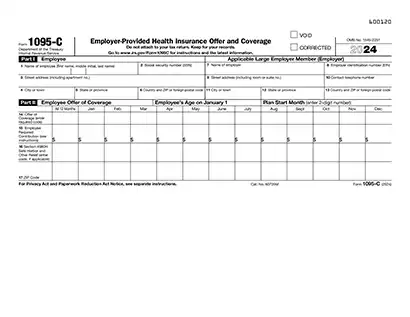
Stop searching and find out why people love the ease of creating beautiful and legally compliant 2024 Form 1095 with PDFSimpli.




Form 1095, also known as the Health Insurance Information Form, is an IRS document provided to individuals who had health insurance coverage during the tax year. It details information about your coverage to help you complete your tax return. There are three types of Form 1095:
Form 1095-A: For individuals who purchased insurance through the Health Insurance Marketplace.
Form 1095-B: For those covered by insurance providers such as Medicaid or Medicare.
Form 1095-C: For employees covered by employer-sponsored health insurance.
This form is essential for verifying health coverage and reconciling any Premium Tax Credit you may have received.
Individuals typically do not fill out Form 1095 themselves. Instead:
The Health Insurance Marketplace provides Form 1095-A to enrollees.
Insurance providers issue Form 1095-B to policyholders.
Employers provide Form 1095-C to eligible employees.
Taxpayers are responsible for retaining these forms to file their tax returns accurately.
Preparation: Before you begin, ensure you have the following documents: Your Form 1095-A, 1095-B or 1095-C. Any tax documents related to health insurance coverage (e.g., Form 8962). Taxpayer Identification Numbers for covered individuals. Premium payments and credit information if applicable
Your Form 1095-A, 1095-B or 1095-C.
Any tax documents related to health insurance coverage (e.g., Form 8962).
Taxpayer Identification Numbers for covered individuals.
Premium payments and credit information if applicable
Choose PDFSimpli: With PDFSimpli, you can easily edit and manage your 2024 Form 1095. Upload your form to our platform, make edits and sign digitally — all without needing to download software.
Fill out or edit: Using PDFSimpli’s tools: Hover over form fields to detect them automatically. Type directly into editable fields or add text manually using the Text Tool. Use the Signature Tool to sign your form digitally by typing, drawing or uploading your signature.
Hover over form fields to detect them automatically.
Type directly into editable fields or add text manually using the Text Tool.
Use the Signature Tool to sign your form digitally by typing, drawing or uploading your signature.
Review your form: Double-check that all information, including health coverage details and taxpayer numbers, is accurate. Verify that no sections are incomplete or contain errors.
Download and save: Once complete, download, save or print your Form 1095. Keep a copy for your records and ensure you attach any necessary supporting documents to your tax return.
Form 1095 is an IRS document that provides information about your health insurance coverage for the 2024 tax year. It serves to confirm whether you, your spouse, and dependents had health coverage during the year, as required by the Affordable Care Act (ACA). Form 1095 is used to determine eligibility for the Premium Tax Credit and to reconcile any advance credit payments received.
There are three variations of Form 1095:
Taxpayers typically do not file Form 1095 themselves. Instead:
You should keep Form 1095 for your records and use it to complete your tax return if applicable.
To file your 2024 tax return, ensure you have the following documents:
Form 1095 is not filed directly with your tax return, but its information is crucial for accurate filing. Use the data from Form 1095-A to complete Form 8962 and reconcile any advance Premium Tax Credit payments. Keep all Form 1095 variations for your records in case the IRS requests them.
If your 2024 Form 1095 contains incorrect information, contact the issuer (Marketplace, insurer, or employer) immediately to request a correction. The issuer will send an updated form to you and the IRS. If you’ve already filed your tax return, you may need to amend it using Form 1040-X.
Here are the important IRS deadlines for individuals filing tax returns with Form 1095 for the 2024 tax year:
Form 1095 is an IRS document that provides information about your health insurance coverage for the 2024 tax year. It serves to confirm whether you, your spouse, and dependents had health coverage during the year, as required by the Affordable Care Act (ACA). Form 1095 is used to determine eligibility for the Premium Tax Credit and to reconcile any advance credit payments received. There are three variations of Form 1095: Form 1095-A: Issued by the Health Insurance Marketplace. Form 1095-B: Issued by insurance providers for Medicaid, Medicare, or other coverage. Form 1095-C: Issued by large employers offering health insurance.
Taxpayers typically do not file Form 1095 themselves. Instead: Form 1095-A is sent to individuals who purchased health insurance through the Marketplace. Form 1095-B is sent to individuals covered by Medicaid, Medicare, or private insurers. Form 1095-C is sent to employees of large employers. You should keep Form 1095 for your records and use it to complete your tax return if applicable.
To file your 2024 tax return, ensure you have the following documents: Form 1095-A, 1095-B, or 1095-C: For health coverage details. Form W-2: For income earned from employers. Form 1099: For additional income sources like freelance work or dividends. Receipts for medical expenses (if itemizing deductions). Form 8962: To calculate and reconcile the Premium Tax Credit if applicable.
Form 1095 is not filed directly with your tax return, but its information is crucial for accurate filing. Use the data from Form 1095-A to complete Form 8962 and reconcile any advance Premium Tax Credit payments. Keep all Form 1095 variations for your records in case the IRS requests them.
If your 2024 Form 1095 contains incorrect information, contact the issuer (Marketplace, insurer, or employer) immediately to request a correction. The issuer will send an updated form to you and the IRS. If you’ve already filed your tax return, you may need to amend it using Form 1040-X.
Here are the important IRS deadlines for individuals filing tax returns with Form 1095 for the 2024 tax year: Last date to file your Form 1040 tax return, which should include your Form 1095, is April 15, 2025. Last date for transmitting timely filed Forms 4868 (Application for Automatic Extension to File) is April 15, 2025. Last date for retransmitting rejected timely filed returns is April 20, 2025. Last date for retransmitting rejected timely filed Forms 4868 is April 20, 2025. Transmitting timely filed Form 4868 or Form 2350 (Application for Automatic Extension to File for U.S. Taxpayers Abroad) to meet overseas exception is June 16, 2025. Retransmitting rejected timely filed Forms 4868 or 2350 to meet overseas exception is June 21, 2025. Last date for transmitting returns on extension from Form 4868 is October 15, 2025. Last date for retransmitting rejected, late, or returns on extension from Form 4868 is October 20, 2025.
Select Language






© 2026 , WorkSimpli Software, LLC. All rights reserved.