2024 Form 1098 Template
Stop searching and find out why people love the ease of creating beautiful and legally compliant 2024 Form 1098 with PDFSimpli.
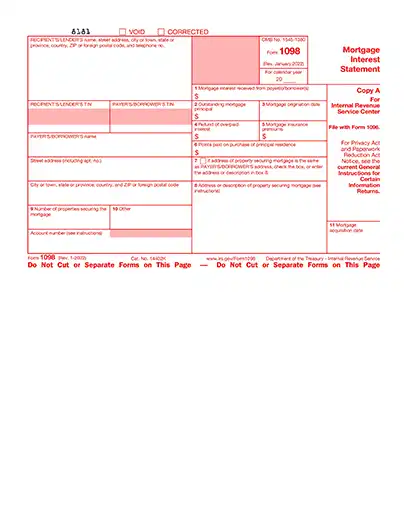
Stop searching and find out why people love the ease of creating beautiful and legally compliant 2024 Form 1098 with PDFSimpli.




The 2024 Form 1098, or the Mortgage Interest Statement, is an IRS tax document used to report mortgage interest of $600 or more paid during the tax year. This form is provided by lenders to borrowers who have paid interest on a mortgage secured by real estate, such as a home or commercial property. It helps taxpayers claim the mortgage interest deduction on their tax return, reducing their taxable income if they itemize deductions.
Reports mortgage interest of $600 or more paid to lenders
Includes other related expenses such as mortgage insurance premiums or points
Used by taxpayers to claim the mortgage interest deduction
This form is vital for taxpayers who want to take advantage of deductions related to mortgage interest, making it easier to reduce their overall tax liability.
Form 1098 is typically filled out by lenders, banks or other financial institutions that receive mortgage interest payments from borrowers. Here’s who it applies to:
Lenders and financial institutions who received $600 or more in mortgage interest during the tax year
Mortgage servicers responsible for managing borrower payments
Banks or credit unions that provide home loans secured by real estate If you’re a borrower, you will receive Form 1098 from your lender, which you can use to prepare your tax return.
Preparation: Before you start, gather the necessary information to complete the 2024 Form 1098: Lender’s Name, Address and Taxpayer Identification Number (TIN) Borrower’s Name, Address and Social Security Number (SSN) Total mortgage interest paid during the year Points paid on the mortgage (if applicable) Any mortgage insurance premiums paid
Lender’s Name, Address and Taxpayer Identification Number (TIN)
Borrower’s Name, Address and Social Security Number (SSN)
Total mortgage interest paid during the year
Points paid on the mortgage (if applicable)
Any mortgage insurance premiums paid
Choose PDFSimpli: PDFSimpli makes filling out your 2024 Form 1098 simple and hassle-free. No software downloads are required — just upload your form to our secure online editor. You can easily fill, save and even sign your form with just a few clicks.
Fill out or edit: Using PDFSimpli’s user-friendly editor: Detect form fields automatically by hovering over them (highlighted in blue). Click to type directly into the fields or manually add text using the Text Tool. Use the Signature Tool to sign your form electronically by typing, drawing or uploading a signature image.
Detect form fields automatically by hovering over them (highlighted in blue).
Click to type directly into the fields or manually add text using the Text Tool.
Use the Signature Tool to sign your form electronically by typing, drawing or uploading a signature image.
Review your form: Carefully review your completed 2024 Form 1098 for accuracy. Verify that all information, including taxpayer details and mortgage interest amounts, is correct. Double-check for typos or missing data.
Download and save: Once you’re satisfied with your Form 1098, click the download, save or print buttons in the PDFSimpli editor. Keep a digital copy for your records or print a physical version to submit.
Form 1098 is used to report mortgage interest payments made by borrowers to lenders. Its primary purpose is to help borrowers who are homeowners or real estate investors claim a deduction for mortgage interest on their tax returns. This deduction reduces taxable income, potentially lowering the amount of taxes owed. Form 1098 may also include details about mortgage insurance premiums and points paid, both of which may be deductible under certain conditions.
Lenders, banks and financial institutions are required to send Form 1098 to borrowers who have paid $600 or more in mortgage interest during the tax year. Borrowers receive the form by January 31st of the following year and use it to prepare their tax returns. It’s important for borrowers to check the information on the form to ensure it’s accurate, as the IRS also receives a copy and uses it to cross-check the data reported on your tax return.
Form 1098 is only required if a borrower has paid $600 or more in mortgage interest during the tax year. For amounts less than $600, lenders are not required to issue the form, but borrowers should still keep track of these payments. Even without a Form 1098, you may still claim a deduction for eligible mortgage interest if you have proper documentation, such as bank statements or payment receipts.
Borrowers use Form 1098 to claim the mortgage interest deduction on their tax return if they itemize deductions instead of taking the standard deduction. The form also helps determine if you qualify to deduct other related costs, such as points or mortgage insurance premiums. These deductions can significantly lower taxable income, making Form 1098 a valuable tool for reducing your tax liability, especially for homeowners with large mortgages.
If the information on your Form 1098 is incorrect, contact your lender or financial institution immediately to request a correction. The lender must issue a revised form with accurate details and send it to both you and the IRS. If you’ve already filed your tax return using the incorrect Form 1098, you may need to file an amended tax return (Form 1040-X) to ensure the correct information is submitted to the IRS.
Here are the important IRS deadlines for individuals filing tax returns that include Form 1098:
Form 1098 is used to report mortgage interest payments made by borrowers to lenders. Its primary purpose is to help borrowers who are homeowners or real estate investors claim a deduction for mortgage interest on their tax returns. This deduction reduces taxable income, potentially lowering the amount of taxes owed. Form 1098 may also include details about mortgage insurance premiums and points paid, both of which may be deductible under certain conditions.
Lenders, banks and financial institutions are required to send Form 1098 to borrowers who have paid $600 or more in mortgage interest during the tax year. Borrowers receive the form by January 31st of the following year and use it to prepare their tax returns. It’s important for borrowers to check the information on the form to ensure it’s accurate, as the IRS also receives a copy and uses it to cross-check the data reported on your tax return.
Form 1098 is only required if a borrower has paid $600 or more in mortgage interest during the tax year. For amounts less than $600, lenders are not required to issue the form, but borrowers should still keep track of these payments. Even without a Form 1098, you may still claim a deduction for eligible mortgage interest if you have proper documentation, such as bank statements or payment receipts.
Borrowers use Form 1098 to claim the mortgage interest deduction on their tax return if they itemize deductions instead of taking the standard deduction. The form also helps determine if you qualify to deduct other related costs, such as points or mortgage insurance premiums. These deductions can significantly lower taxable income, making Form 1098 a valuable tool for reducing your tax liability, especially for homeowners with large mortgages.
If the information on your Form 1098 is incorrect, contact your lender or financial institution immediately to request a correction. The lender must issue a revised form with accurate details and send it to both you and the IRS. If you’ve already filed your tax return using the incorrect Form 1098, you may need to file an amended tax return (Form 1040-X) to ensure the correct information is submitted to the IRS.
Here are the important IRS deadlines for individuals filing tax returns that include Form 1098: Last date to file your Form 1040 tax return, which may include information from Form 1098 if you’re claiming mortgage interest deductions, is April 15, 2025. Last date for transmitting timely filed Forms 4868 (Application for Automatic Extension to File) is April 15, 2025. Last date for retransmitting rejected timely filed returns is April 20, 2025. Last date for retransmitting rejected timely filed Forms 4868 is April 20, 2025. Transmitting timely filed Form 4868 or Form 2350 (Application for Automatic Extension to File for U.S. Taxpayers Abroad) to meet overseas exception is June 16, 2025. Retransmitting rejected timely filed Forms 4868 or 2350 to meet overseas exception is June 21, 2025. Last date for transmitting returns on extension from Form 4868 is October 15, 2025. Last date for retransmitting rejected, late, or returns on extension from Form 4868 is October 20, 2025.
Select Language






© 2026 , WorkSimpli Software, LLC. All rights reserved.