2024 1099-MISC Form Template
Stop searching and find out why people love the ease of creating beautiful and legally compliant 2024 1099-MISC Form with PDFSimpli.
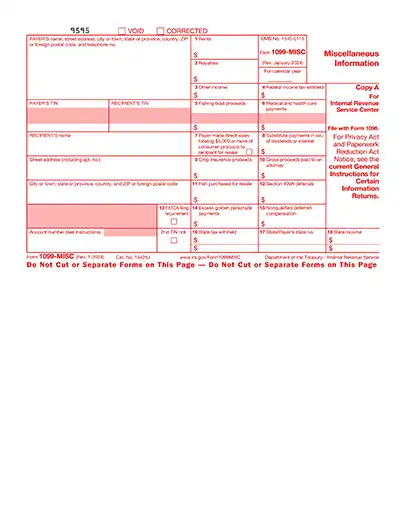
Stop searching and find out why people love the ease of creating beautiful and legally compliant 2024 1099-MISC Form with PDFSimpli.




The 2024 Form 1099-MISC, or the Miscellaneous Income form, is an IRS tax document used to report payments made to individuals or businesses who are not employees. Common uses for Form 1099-MISC include reporting:
Payments to independent contractors or freelancers
Rent payments for office or property use
Royalties exceeding $10
Prizes and awards paid as part of your business activities
This form is essential for ensuring that non-employees report their earnings correctly and that your business complies with IRS regulations.
Form 1099-MISC is typically filled out by businesses or individuals who have paid $600 or more to a non-employee during the tax year. Here’s who it applies to:
Businesses that pay independent contractors or freelancers
Landlords reporting rental income paid to property managers or vendors
Payors of royalties of $10 or more
Anyone issuing payments for prizes, awards, or other miscellaneous income of $600 or more.If you’ve made qualifying payments, you’re responsible for completing this form and providing a copy to the recipient and the IRS
Preparation: Before you start, gather the necessary information to complete your 2024 Form 1099-MISC: Employer Identification Number (EIN) or Social Security Number Recipient’s Taxpayer Identification Number (TIN) Details of payments made (amounts, payment dates, and purpose) Deadline reminders: Remember to send forms to recipients and the IRS by January 31st
Employer Identification Number (EIN) or Social Security Number
Recipient’s Taxpayer Identification Number (TIN)
Details of payments made (amounts, payment dates, and purpose)
Deadline reminders: Remember to send forms to recipients and the IRS by January 31st
Choose PDFSimpli: PDFSimpli simplifies the process of completing your 2024 1099-MISC form. No downloads are required — just upload your form to our online editor to fill, save and even sign it. Start by clicking the “Get Started” button on our website.
Fill out or edit: Using PDFSimpli’s user-friendly editor: Automatically detect form fields by hovering over them (highlighted in blue). Click to type directly into the fields or manually place text using the Text Tool. Use the Signature Tool to sign your form. You can type, draw or upload a signature image.
Automatically detect form fields by hovering over them (highlighted in blue).
Click to type directly into the fields or manually place text using the Text Tool.
Use the Signature Tool to sign your form. You can type, draw or upload a signature image.
Review your form: Carefully review your completed 2024 1099-MISC form to ensure all fields are filled accurately, Taxpayer Identification Numbers (TINs) and payment amounts are correct and no sections are incomplete or contain typos.
Download and save: Once you’re satisfied with your 2024 Form 1099-MISC, click the download, save or print button. Save a digital copy or print a physical version for your records.
Form 1099-MISC is an informational tax document used by businesses to report payments of $600 or more made to individuals or entities who are not employees, such as independent contractors, landlords or service providers. The purpose is to ensure the IRS is aware of taxable income that recipients are responsible for reporting on their tax returns. This helps maintain compliance with tax laws and prevents underreporting of income. Common payments reported on Form 1099-MISC include rent, royalties, prizes or awards.
In most cases, you do not need to file Form 1099-MISC for payments under $600, as the IRS threshold for reporting is $600 or more. However, there are exceptions:
Filing Form 1099-MISC with the IRS can be done in two ways:
Missing the January 31st deadline for filing Form 1099-MISC can lead to IRS penalties, which increase based on how late you file:
For large businesses, penalties can accumulate to $3.3 million annually. To avoid these costly penalties, it’s important to stay organized and use tools like PDFSimpli to meet deadlines.
Yes, errors on Form 1099-MISC can be corrected by filing Form 1099-MISC Correction. This form allows you to fix mistakes such as incorrect recipient details, amounts, or taxpayer identification numbers (TINs). Once corrected, submit the updated form to the IRS and provide a copy to the recipient. PDFSimpli makes it easy to revise your forms without starting from scratch, ensuring accuracy and compliance with minimal hassle.
Here are the important dates for individuals filing the Form 1099-MISC
Form 1099-MISC is an informational tax document used by businesses to report payments of $600 or more made to individuals or entities who are not employees, such as independent contractors, landlords or service providers. The purpose is to ensure the IRS is aware of taxable income that recipients are responsible for reporting on their tax returns. This helps maintain compliance with tax laws and prevents underreporting of income. Common payments reported on Form 1099-MISC include rent, royalties, prizes or awards.
In most cases, you do not need to file Form 1099-MISC for payments under $600, as the IRS threshold for reporting is $600 or more. However, there are exceptions: Royalty payments must be reported if they total $10 or more during the year. Certain backup withholding payments may also require reporting, regardless of the amount. Even if it’s not required, some businesses choose to issue a 1099-MISC for smaller payments to maintain detailed financial records.
Filing Form 1099-MISC with the IRS can be done in two ways: Electronically: Use the IRS FIRE System (Filing Information Returns Electronically). This method is faster and preferred for large filings. By Mail: Submit paper forms directly to the IRS. Keep in mind that mailed forms must be postmarked by the January 31st deadline. You must also provide a copy of the completed Form 1099-MISC to the recipient. To simplify the process, PDFSimpli allows you to fill, save and print your forms easily, ensuring they’re ready for submission without errors or delays.
Missing the January 31st deadline for filing Form 1099-MISC can lead to IRS penalties, which increase based on how late you file: $50 per form for filings within 30 days after the deadline $110 per form for filings made between 31 days late and August 1st $280 per form for filings after August 1st or not filed at all For large businesses, penalties can accumulate to $3.3 million annually. To avoid these costly penalties, it’s important to stay organized and use tools like PDFSimpli to meet deadlines.
Yes, errors on Form 1099-MISC can be corrected by filing Form 1099-MISC Correction. This form allows you to fix mistakes such as incorrect recipient details, amounts, or taxpayer identification numbers (TINs). Once corrected, submit the updated form to the IRS and provide a copy to the recipient. PDFSimpli makes it easy to revise your forms without starting from scratch, ensuring accuracy and compliance with minimal hassle.
Here are the important dates for individuals filing the Form 1099-MISC Last date for transmitting timely filed Form 1040, which should include Form 1099-MISC, is April 15, 2025. Last date for transmitting timely filed Forms 4868 (Application for Automatic Extension to File) is April 15, 2025. Last date for retransmitting rejected timely filed returns is April 20, 2025. Last date for retransmitting rejected timely filed Forms 4868 is April 20, 2025. Transmitting timely filed Form 4868 or Form 2350 (Application for Automatic Extension to File for U.S. Taxpayers Abroad) to meet overseas exception is June 16, 2025. Retransmitting rejected timely filed Forms 4868 or 2350 to meet overseas exception is June 21, 2025. Last date for transmitting returns on extension from Form 4868 is October 15, 2025. Last date for retransmitting rejected, late, or returns on extension from Form 4868 is October 20, 2025.
Select Language






© 2026 , WorkSimpli Software, LLC. All rights reserved.