Pay Stub PDF Template
Stop searching and find out why people love the ease of creating beautiful and legally compliant Pay Stub PDF with PDFSimpli.
Stop searching and find out why people love the ease of creating beautiful and legally compliant Pay Stub PDF with PDFSimpli.




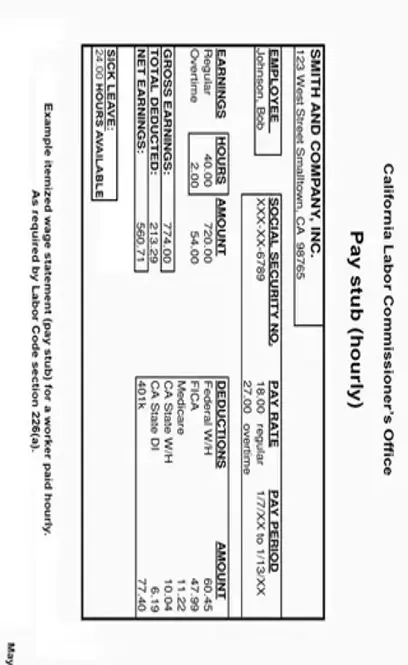
Employee and Employer Information: The paystub contains basic details such as your name, address and Social Security Number. It also includes the employer’s name and contact information, ensuring the pay stub is associated with the correct employee and company.
Pay Period: The pay stub displays the specific dates for the pay period that the earnings statement covers. Depending on the employer’s pay schedule, this period might be weekly, biweekly (every two weeks), semimonthly (twice a month) or monthly.
Earnings:This section outlines the various types of income you’ve earned during the pay period.
– Regular Wages: The amount you earn based on your regular hourly rate or salary.
– Overtime: Additional pay you earned for working more than your regular hours.
– Bonuses and commissions: Any extra compensation you earned through bonuses or commissions.
– Paid time off (PTO): The total PTO hours you took during the pay period and its corresponding value. This could include sick leave and vacation leave.
Deductions: This section details the various amounts withheld from your gross earnings to cover taxes, benefits and other contributions. Common deductions include:
– Federal income tax: This is the amount withheld to cover federal income tax obligations.
– State Income tax: If applicable, this is the amount withheld to cover state income taxes.
– Social Security tax: This is a percentage of your earnings paid into the Social Security program.
– Medicare tax: This is a percentage of earnings paid into the Medicare program.
– Health insurance premiums: This is the portion of health insurance cost paid through payroll deductions.
– Retirement contributions: If you contribute to a retirement plan, this deduction reflects those contributions.
Net Pay: After subtracting all deductions from your gross earnings, the paystub will show the “Net Pay” or “Take-Home Pay” amount. You will receive this amount in your paycheck after taxes and deductions have been accounted for.
Year-to-Date (YTD) Totals: The paystub may include YTD totals for earnings and deductions. This section helps you track your income and contributions throughout the year.
Understanding your paystub is essential to manage your finances effectively. Reviewing each section ensures that your earnings, deductions and taxes are accurately reflected each pay period. If you have any questions or concerns about your pay stub, contact your employer’s HR department or accounting team for clarification.
Filling out a paycheck stub PDF form with PDFSimpli is extremely useful for individuals seeking to know relevant income information for themselves or to provide to their employees. Income stubs generally contain information regarding the employer‘s tax status, employee‘s earnings, gross pay, online pay (direct deposit), employee payroll taxes and other taxes retained, employee‘s length of employment and pay frequency.
These stubs are useful for helping individuals determine consistent payments in any credit arrangement, including home leases, car purchases, mortgage loans, and credit card payments. Pay stubs are generally provided by an employer but may also be used personally by individuals such as contractors and self-employed workers to track their income.
If you want to fill out a free paycheck stub PDF form, use this template using PDFSimpli.
Step 1: Download the free paycheck stub PDF form from a reputable website or word processor and gather relevant information. For employers and employees, the information needed for the process includes the employee’s Social Security Number, year-to-date earnings, earnings for the last pay period, date of pay period, Employer Identification Number (EIN), employer name and address and tax amounts for each withholding section.
Step 2:Fill in the employer’s and employee’s addresses before inputting other values. If your work is lost in any way, this information will auto-populate.
Step 3: All the information gathered in Step 1 should now be entered into the pay stub PDF. If a section does not apply or you are completing the form as a self-employed person), you can delete it by left-clicking on it and choosing the option to delete.
Step 4: Calculate any deductions that should be removed from the check. By entering the address of the employee and employer in the first step, these values should automatically populate based on the tax percentage in the state. However, if there are errors, you can alter the percentage. Regardless, be sure the values are represented accurately because they are important when establishing proof of income.
Step 5: Save or print the document for your records. If you want to continue this process regularly (which we recommend), select the option to add payment records continually. This way, the information that remains the same won’t have to be re-entered the next time you log in to create a stub. You will simply need to enter the values for the new payment period.
Select Language






© 2026 , WorkSimpli Software, LLC. All rights reserved.