Crash Report MA PDF Template
Stop searching and find out why people love the ease of creating beautiful and legally compliant Crash Report MA PDF with PDFSimpli.
Stop searching and find out why people love the ease of creating beautiful and legally compliant Crash Report MA PDF with PDFSimpli.




[toc] Motor vehicle accidents are scary experiences. After you’re involved in an accident, you might find yourself overwhelmed by the repercussions. It’s even more difficult to move forward emotionally when there were injuries involved in the crash. In the state of Massachusetts, certain automobile crashes must be reported to the DMV using an official form. This crash operator report then becomes part of your permanent driving record, whether or not you were at fault for the accident. The DMV is not responsible for determining which party or parties were at fault.
Massachusetts is one of many states that requires serious automobile crashes to be reported to its DMV. The DMV is the regulating body for all motor vehicles in the state, so crash records are kept with them. In most cases, the police at the scene will be responsible for filing a crash report with the DMV. This report will also play a large role in determining which individual was at fault for the accident, which could affect insurance payouts. That said, the DMV has nothing to do with your insurance company.
In certain circumstances, you might be required to file a report yourself. Sometimes, the state prefers to have a police report along with a report from each of the drivers. It helps to get everyone’s side of the story. You might also have to file a report if the police are unable to make their own report for some reason, a vehicle needed to be towed from the scene of the accident, or the police report will be delayed in its filing.
The most common entities who use crash reports in Massachusetts are law enforcement officials, drivers involved in crashes, and pedestrians involved in crashes. Any party who was part of the accident will be required to file a report.
When the driver of a vehicle involved in a crash was not the vehicle’s owner, the responsibility is on the owner of the vehicle to file the crash report. They must use the information and knowledge they’ve obtained about the crash to detail the report to the best of their ability.
According to Massachusetts state law, drivers are required to file a crash report in the following circumstances:
A person involved was killed
A person involved was injured
One individual’s property sustained at least $1,000 worth of damage
When you complete the report, you’re required to file a copy of it with the police department that has jurisdiction over the crash. Filing must be completed within 5 days after the crash occurs, unless the person lacks the capability to do so because they are incapacitated.
If you’re involved in a crash that meets the disclosure requirements, and you fail to make your report within 5 days, the DMV has the right to suspend your license. Your license will remain suspended until you file the report. Depending on the circumstances, you may also need to pay a reinstatement fee for your license. You can find information on your reinstatement requirements through the Massachusetts government website.
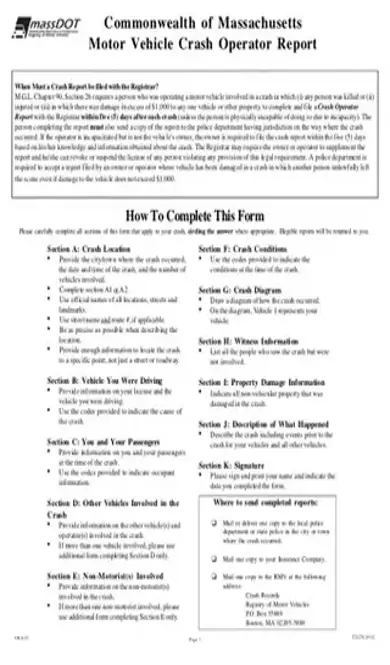
You only need to fill out the sections of the form that are relevant to your crash. Where it’s appropriate, you should circle your answers. If the report is illegible, you’ll need to redo it.
Provide details about the location in which the crash occurred, including the city or town, the time and date, and the number of vehicles that were part of the collision. If the crash occurred at an intersection, you should complete Section A1; if not, complete Section A2.
Write out the official names of any landmarks, streets, and locations. If the street has a route number, you should use both the street name and the number. Try to be as precise as you can, giving enough information for people to pinpoint the exact location.
This is where you’ll fill out your license information, along with information about the vehicle being driven. You’ll need the make, model, year, and other identifying information. There are codes provided to indicate what caused the crash.
This section is used to detail information about both you and your vehicle’s passengers when the crash occurred. The form provides codes that you’ll use to explain information about the occupants.
You’ll need information about other vehicles and drivers who were involved. With multiple-vehicle crashes, you should attach a second report to this one, but only complete Section D.
If any non-motorists — like pedestrians or bicyclists — were involve, provide as much information as you can. When multiple non-motorist entities were involved, you should attach a second form and complete Section E alone.
You’re given codes. Indicate the one that corresponds to the weather and road conditions when the crash occurred.
Draw a rough sketch of how the crash happened. Your vehicle should be labeled Vehicle 1, while any other vehicles should be labeled Vehicle 2, Vehicle 3, etc.
If any bystanders saw the crash happen but were not directly involved, this is where you’ll list their personal and contact information.
This section is meant to categorize all property damage that didn’t occur to a vehicle. This might include the personal property of the motorists or public property, such as signs and buildings.
Beginning with the events prior to the crash, describe what happened in as much detail as possible. Include the movement of your vehicle and any other involved vehicles.
You’ll need to both print and sign your name. Then, indicate what day you completed your form.[pdf-embedder url=”https://cdn-prod-pdfsimpli-wpcontent.azureedge.net/pdfseoforms/pdf-20180219t134432z-001/pdf/crash-report-ma.pdf”]
Make three copies. One should be filed with the DMV, one with the police department, and one with your insurance company.
This will vary widely depending on the crash circumstances and the insurance policy. For the most part, insurance investigators will abide most stringently by the police report.
The report will be used to help in any ongoing police investigations of the crash. Then it will be filed for their records.
Select Language






© 2026 , WorkSimpli Software, LLC. All rights reserved.