50-114 PDF Template
Stop searching and find out why people love the ease of creating beautiful and legally compliant 50-114 PDF with PDFSimpli.
Stop searching and find out why people love the ease of creating beautiful and legally compliant 50-114 PDF with PDFSimpli.




[toc] In the state of Texas, property taxes are locally assessed and administered. This means that people do not have to pay state property taxes. The property taxes are the largest amount of revenue that goes directly to the local government. The local governments use this revenue to pay for roads, firemen and police, emergency response teams, parks, libraries, schools, and any other services that the local government provides.
It’s possible for people to receive exemptions on their local property tax assessment. These exemptions might be partial or total. In the case of partial exemptions, a percentage of a property’s value or a fixed dollar amount will be removed from the taxation. In cases involving total exemptions, a person’s entire property is exempted from the local property tax.
The state also mandates that taxing units offer mandatory exceptions in some circumstances. Any exemptions that aren’t state-mandated can be discussed by the local governments. Different local governments have different rulings on which exemptions people qualify for.
To become exempt from property tax in any way, you’ll most likely need to file an application. This application will then be filed with your appraisal district. If you intend to file an exemption for the current tax year, you must have completed and filed your application paperwork prior to May 1. The district chief appraisers will go over the claim to determine whether the property meets the qualifications for an exemption.
There are a great number of requirements that must be filled before a person can file to have a property tax exemption.
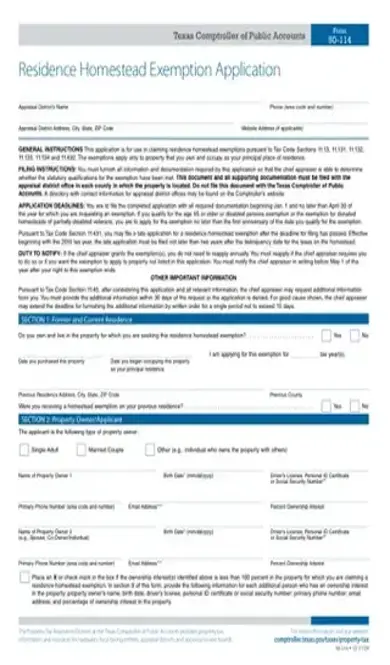
The 50-114 form is the application for a property tax exemption. Any property owner who believes they may qualify for a tax exemption should file this application with their appraisal district.
The particular exemptions that apply will vary widely depending on the local government’s provisions. Because there is no state property tax, local governments have exclusive control over the exemption laws. A person in one district might qualify for entirely different exemptions from a person in a neighboring district with a similar property.
It’s important to become familiar with the types of exemptions that your local government offers. Some state-mandated exemptions are available across all Texas locations, while other types of exemption opportunities are for the local government to decide.
If a Texas property owner believes they meet their local exemption requirements for property taxes, and they wish to claim these exemptions, they should file this application form. However, there’s no point to filing the application if you do not meet your local exemption requirements, or if you do not wish to claim the exemption.
Failing to file the form means that you will not receive any exemptions on your property taxes for the current year. You must make sure that the application is filed in the correct local office, otherwise known as the local office in which the property resides. If you have multiple properties in different districts, and more than one of them qualifies for an exemption, you will need to create a copy of this application for each applicable property.
If you want to claim the tax exemption for the current fiscal year, you need to file your application prior to May 1. Applications filed after May 1 will apply to the following fiscal year if approved, assuming the exemption guidelines do not change between the current fiscal year and the next.
In Section 1, you’ll give information about your current and former residence. You’ll need to explain whether you reside in the property for which you’re making an exemption application. You’ll also need the date of the property purchase, the date you moved into the property, the tax year you’re applying for, and the address of whatever residence you lived in previously.
Section 2 will take down the name and contact information of the property owner. You’ll need to have your driver’s license number on hand. If your spouse’s name is also on the deed, you’ll need their information as well, including driver’s license number.
In Section 3, you’ll need to place a check mark by any type of exemption you wish to claim. Before you do, you should make sure this exemption is offered by your local government. Not all exemptions are offered by all governments. If you’re filing for a surviving spouse exemption, you will need to provide your deceased spouse’s name, along with the date of their death.
Section 4 is about the property itself. You must give the property’s physical address and the legal description, should you know it. Fill out the mailing address portion only if your mailing address is different from your principal residence. For people whose principal residence is a mobile or manufactured home, they must provide the ID number, make, and model of the home.
Section 5 lists the application documents you need. You’ll have to attach a copy of your current driver’s license or other identification card. If you check any of the boxes in Section 5, you’ll need to attach a copy of the requested paperwork.
If your intention is to transfer a surviving spouse exemption or tax limitation exemption from your previous residence, you’ll need to check the appropriate box in Section 6. Otherwise, you can skip Section 6 entirely.
Section 7 lists the proof of ownership documentation and affidavits you must provide. Section 8 is a place for additional comments, should any additional information be required. You will then be required to print your name and sign.[pdf-embedder url=”https://cdn-prod-pdfsimpli-wpcontent.azureedge.net/pdfseoforms/pdf-20180219t134432z-001/pdf/form-50-114.pdf”]
Property taxes are the main source of revenue for local governments. As such, the state government believes that local governments should be the ones responsible for enforcing the property taxes.
Look for a list of property tax legislation that’s been drafted and passed by your district government.
This really depends on the office. You can expect an answer in anywhere from a few days to several months.
Select Language






© 2026 , WorkSimpli Software, LLC. All rights reserved.