IRS 8962 for 2015 PDF Template
Stop searching and find out why people love the ease of creating beautiful and legally compliant IRS 8962 for 2015 PDF with PDFSimpli.
Stop searching and find out why people love the ease of creating beautiful and legally compliant IRS 8962 for 2015 PDF with PDFSimpli.




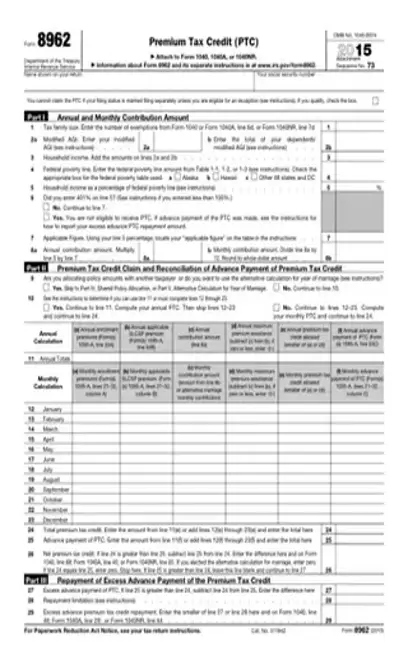
[toc] Individuals use IRS form 8962 for 2015 to calculate their premium tax credit to include on their tax return, Form 1040, 1040A or 1040NR. The individual must include it with the tax return. This form helps you calculate your tax credit and is part of the tax forms needed to file on income tax return season. The IRS (Internal Revenue Service) needs for you to fill out this income tax document if your filing status requires a premium tax credit. Edit your 8962 here with PDFSimpli!
Form 8962, also known as the Premium Tax Credit form, leads the individual taxpayer through the process of figuring the amount of their premium tax credit (PTC). The PTC provides a refundable credit to help eligible low-to-moderate income individuals and families afford health insurance in the Health Insurance Marketplace. The 2015 form would only apply to the tax year 2015. [pdf-embedder url=”https://cdn-prod-pdfsimpli-wpcontent.azureedge.net/pdfseoforms/pdf-20180219t134432z-001/pdf/irs-form-8962-for-2015.pdf?sv=2018-03-28&si=readpolicy&sr=c&sig=MXHnWmn0sXNXztiU%2Bugk2d7DV7KBCOuXF3oBMx0EeEw%3D”]
Individuals and families with low-to-moderate incomes may qualify for the PTC. IRS Form 8962 list the credit-eligible individuals in its’ instruction section. If you purchased insurance through the Marketplace and received a 1095-A form documenting your coverage, you do complete IRS Form 8962.
Since this form must accompany the individual’s or family’s tax return, the taxpayer must also complete it by April 15th of the appropriate tax year.
The IRS may reject your return. It also may require an amendment. The IRS can audit you.
Fill in the blank at the top of the form with your name.
Fill in the blank at the top of the form with your name.
Fill in the nine-digit spaces at the top of the form with your Social Security number.
Fill in the nine-digit spaces at the top of the form with your Social Security number.
In part one, fill in your annual and monthly contribution amounts.
In part one, fill in your annual and monthly contribution amounts.
Enter your appropriate number of exemptions and your modified adjusted gross income (MAGI). You will already have entered these on your form 1040, 1040A or 1040NR, so copy the information from there.
Enter your appropriate number of exemptions and your modified adjusted gross income (MAGI). You will already have entered these on your form 1040, 1040A or 1040NR, so copy the information from there.
Using the table in the form instructions, determine your household income as a percentage of the federal poverty line. Enter this on the form.
Using the table in the form instructions, determine your household income as a percentage of the federal poverty line. Enter this on the form.
Enter your annual and monthly contribution amounts on lines 8a and 8b to finish up part one.
Enter your annual and monthly contribution amounts on lines 8a and 8b to finish up part one.
In part two, the individual determines the eligible PTC amount.
In part two, the individual determines the eligible PTC amount.
On line 11, enter your annual total only if you had Marketplace Health coverage the entire year.
On line 11, enter your annual total only if you had Marketplace Health coverage the entire year.
If you had coverage for only some months of the year, use the appropriate lines one per month to enter each month’s contribution.
If you had coverage for only some months of the year, use the appropriate lines one per month to enter each month’s contribution.
Enter the total PTC on line 24.
Enter the total PTC on line 24.
Enter the advance payment of PTC on line 25.
Enter the advance payment of PTC on line 25.
Enter the net premium tax credit on line 26. You’ll determine this by subtracting line 25 from 24, if line 24 is greater than 25.
Enter the net premium tax credit on line 26. You’ll determine this by subtracting line 25 from 24, if line 24 is greater than 25.
Still on line 26, if you chose the alternative calculation for marriage, enter zero.
Still on line 26, if you chose the alternative calculation for marriage, enter zero.
If line 24 and line 25 are the same numbers, enter zero on line 26 and stop completing the form. You’re done.
If line 24 and line 25 are the same numbers, enter zero on line 26 and stop completing the form. You’re done.
Welcome to part three. If the amount on line 25 is greater line 24, do not completely line 26. Fill in line 27 instead of by subtracting line 24 from line 25.
Welcome to part three. If the amount on line 25 is greater line 24, do not completely line 26. Fill in line 27 instead of by subtracting line 24 from line 25.
Enter the repayment limitation on line 28, referencing the form instructions for additional information.
Enter the repayment limitation on line 28, referencing the form instructions for additional information.
On line 29, enter the excess advance premium tax credit repayment. This is the smaller of line 27 or line 28. You owe that amount in repayment for APTC.
On line 29, enter the excess advance premium tax credit repayment. This is the smaller of line 27 or line 28. You owe that amount in repayment for APTC.
Only use part four if the notes on lines 1 and 9 indicated you must. It is for Shared Policy Allocations. You will use this part if you and your spouse file separately, but were covered by the same health insurance policy.
Only use part four if the notes on lines 1 and 9 indicated you must. It is for Shared Policy Allocations. You will use this part if you and your spouse file separately, but were covered by the same health insurance policy.
Only use part five if you are a couple who got married during the tax year for which you’re filing. Consult the instructions for the information necessary to complete this section. Table Four in the instructions helps you determine if you are eligible to elect the alternative calculation for the year you married.
Only use part five if you are a couple who got married during the tax year for which you’re filing. Consult the instructions for the information necessary to complete this section. Table Four in the instructions helps you determine if you are eligible to elect the alternative calculation for the year you married.
¦ References and Graphic Links https://www.quora.com/Do-I-have-to-send-the-IRS-form-8962-Will-I-still-get-my-refund-if-I-do-not-send-in-the-forms https://smartasset.com/taxes/all-about-irs-form-8962
Yes, you’ll need Form 1095-A, better known as the Health Insurance Marketplace Statement, to accompany the 8962 and tax return.
Tax preparation programs simply walk the tax preparer through the process. They include the forms and schedules in their packages.
If you divorced during the year you’re filing taxes for and you shared health insurance for any part of the year, you would both still complete the form and you’d complete part four.
Select Language






© 2026 , WorkSimpli Software, LLC., All rights reserved.