CMS1763 Template
Stop searching and find out why people love the ease of creating beautiful and legally compliant CMS1763 with PDFSimpli.
Stop searching and find out why people love the ease of creating beautiful and legally compliant CMS1763 with PDFSimpli.

Pick from the colors and templates below



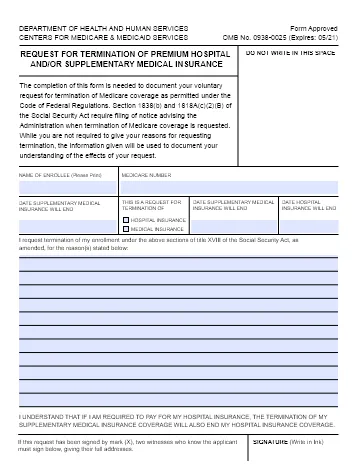
The CMS 1763 form is a legal issued by the Centers of Medicare and Medicaid Services that allows Medicare recipients to terminate their coverage of premium hospital insurance (Premium Part A) and/or supplemental medical insurance (Part B). This is allowed under title XVII of the Social Security Act. Typically, this form is used when someone gains access to other healthcare and no longer needs insurance through Medicare, thus making paying the premiums an unnecessary financial burden. Terminating coverage is a major decision; therefore, submitting the form typically requires an interview with a CMS representative before it can be approved.
Medicare provides health insurance, primarily to older Americans. It was created by the Social Security Administration but is now administered by the CMS, its own governing authority. Most people receive Medicare Part A without any premiums. However, they need to pay income-based premiums for Medicare Part B. Plus, some people may not be eligible for premiums-free Part A. Although there are some government assistance programs to help eligible people with minimal income get coverage under Medicare, there are some circumstances in which someone may want to terminate existing coverage. This is the purpose of the CMS 1763 form.
This form is not used for Medicare Part D (drug coverage), Medicare Part C (advantage plans) or Medicare supplemental insurance (Medigap). Part C and Medigap are administered by outside organizations.
The basic purpose of a CMS 1763 form is very simple: to terminate coverage under Medicare Parts A and B, usually to avoid paying premiums for either of these Medicare parts. However, this is not typically because the recipient cannot afford the premiums because there are government programs to assist with these situations. Instead, people usually terminate their coverage because they have received alternative coverage such as medical insurance through an employed spouse. The process usually involves an interview with a government representative to ensure that termination is the right choice for you.
Using a CMD 1763 form is required for terminating coverage under Medicare Part A and/or B. Failing to complete this process in full will result in you needing to continue paying the premiums for your coverage under these Medicare parts. If you have alternative coverage, it may mean that you are paying for more insurance than you need. Fortunately, the form is very simple to complete, and no additional forms are required. Simply fill out the form and speak with a representative to finish the process. This can be done at any time after you have filed for Medicare coverage. However, you should make sure your other healthcare coverage is active before terminating Medicare.
Although the decision to terminate some or all of your Medicare coverage is a significant choice, the process is quite simple. The CMS 1763 form is a simple, one-page document that only calls for basic identification details and reasoning for the termination. However, it is typically accompanied by an interview with a CMS representative to ensure that termination is the right option for you. These are the key elements of the form:
You will need to include your name and Medicare number. If you are completing the form for someone else, you will need to include both of your names as well as the enrollee’s number.
On the form, you must indicate what type(s) of Medicare coverage you want to terminate. Additionally, you must provide the requested date(s) of termination. The end dates for Part A and Part B can be different.
The most significant part of a CMS 1763 form is the reasoning for the termination. You can describe in plain language why you want to end your coverage. You may have to answer additional questions about this during the interview.
Like all forms, you need to sign it to be valid. You will also need to include your contact details underneath your signature.
Finally, the form must be witnessed by two people who know you. They will need to include their names and addresses.
Before filling out the CMS 1763 form, think about your reasoning for terminating your coverage. Being able to explain this clearly is essential. Make sure to speak with two witnesses and get their information before continuing. You should also think about contacting your local office to discuss termination before submitting the form. That way, you can schedule your interview and address any questions or concerns.
Next, select the software you will use to complete the form. LegalSimpli is a great choice. It makes it easy for you to complete legal forms from your computer. Typing your CMS 1763 form will make it easier to read and process. Plus, you can save your work with LegalSimpli if you need to check any details before continuing.
Using LegalSimpli, fill out the details of the form. It is a relatively simple document with only a few key pieces of information. The most important part of it is your reasoning for termination. Consider reviewing the relevant sections of the Social Security Act to ensure that your reasoning is sound.
Before you send the CMS 1763 form, spend some time reviewing it. Make sure it says what you want, and that all information is accurate. Any typos could cause major delays and frustration for you. Fortunately, you can do this easily online in the LegalSimpli editor. Alternatively, you can print a watermarked copy to review.
Finally, you will be ready to sign the document. You can do this online with LegalSimpli by uploading, drawing or typing a signature. Then, you can print the completed form from your browser. The last step is to mail it to the relevant CMS office. Instructions for this are included with the form.
You only need to complete this form if you are currently covered by Medicare Part A (with premiums) and/or Medicare Part B and want to end coverage of either or both. If you are terminating your Medicare Part A coverage, you may also need to terminate your Part B coverage. You can speak with a CMS representative to learn more about this.
Most recipients of Medicare Part B can terminate coverage at any time using a CMS 1763 form. However, there are some restrictions. You will need to discuss your decision with a CMS representative before proceeding. This is a good time to determine whether this is the right decision for you or not.
Select Language






© 2026 , WorkSimpli Software, LLC. All rights reserved.



