DD2875 Fillable PDF Template
Stop searching and find out why people love the ease of creating beautiful and legally compliant DD2875 Fillable PDF with PDFSimpli.
Stop searching and find out why people love the ease of creating beautiful and legally compliant DD2875 Fillable PDF with PDFSimpli.




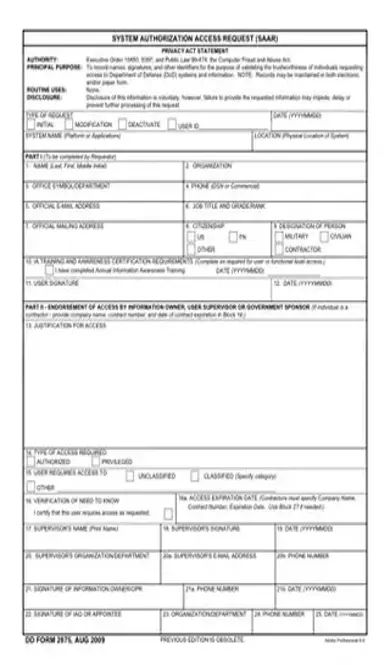
[toc] If a member of the United States Service needs to access the official systems, they’ll be required to file a DD Form 2875. This is a request for system authorization and access. The person will also need to fill out the DPAS Security roles form and the User Agreement to receive access. Even if a person’s DPAS account was deleted because of inactivity, the three forms need to be completed like a new application.
This form is used to request access to the DPAS system. When a person submits this form, they’ll have the opportunity to make a DPAS account. DPAS accounts can only be held by people who have complete this form, along with the other required forms. Sometimes DPAS accounts are deleted because of inactivity. When this is the case, the form is required for the new application.
The main goal is for the form to serve as a system of checks and balances. As such, there are a number of different parties who need to complete and review it before system authorization can be granted.
The user candidate is responsible for entering all boxes up through Box 12. They must then review their responses and provide a signature after verifying their accuracy. After this, the form goes to the candidate’s supervisor. The supervisor will be required to verify all user input, and then complete the Boxes 13 through 20b.
The form then moves to the Site Security officer. This person will verify whatever security level is designated by the form. They will also complete Boxes 28 through 32.
The last involved person is the Information Owner. They’re the final gatekeeper for the requested site identification. They are required to have a letter of appointment filed with DPAS Account Management. It’s their responsibility to make sure the completed form is accurate.
When a person needs access to DPAS, they’ll need to file this form. The form should also be used by their supervisor, the Site Security officer, and the information owner. The owner of the information is responsible for making sure all paperwork is accurate and legal. [pdf-embedder url=”https://cdn-prod-pdfsimpli-wpcontent.azureedge.net/pdfseoforms/pdf-20180219t134432z-001/pdf/dd2875-fillable.pdf”]
People who don’t fill out the form will not be given access to DPAS. If a supervisor fails to fill out the form, it cannot be forwarded to the Site Security officer. Information Owners who fail to review the form will leave their information vulnerable to fraudulent login attempts.
Under “Type of Request,” check the request type you’re making. Do you want to deactivate, modify, or create a new User ID? If you had a User ID previously, write it in the provided line. Date your application in YYYY-MM-DD format.
The “System Name” section is used for the name of the system you’re applying for. Write “DPAS” and provide the system’s physical location.
Give your first, last, and middle name. Then provide the branch of the Service you’re part of. You’ll need to give your office department, phone number, and official email address.
Provide your job title along with your ranking or grade. Then write your official mailing address. Indicate your citizenship status by checking one of the provided boxes for “US,” “FN,” or “Other.”
If you’re a member of the military, check the “Military” designation. In Box 10, you’ll certify that you’ve completed any required awareness training, along with the date that training was completed.
Review all of the information to make sure it’s accurate.
Sign and date the form.
Use Box 13 to explain why the applicant needs access to the system. Then check whether the applicant is looking for access to privileged or authorized information.
If the particular information required is classified, check this box and specify the category. If it’s unclassified, check this box. For any other reasons, check the “Other” box and give your reasoning.
Check the box certifying that the user does require this access.
If there’s an expiration date for the access, note it in 16a.
Write your name and sign the form. Add the date in YYYY-MM-DD format. Then provide your department, email address, and phone number.
Note the type of background investigation being conducted, along with the date it’s conducted and the clearance level to know about it. You’ll also need to write the IT designation level.
Print your name in Box 29. In Box 30, you’ll provide your phone number, along with a signature in Box 31. Date the application in YYYY-MM-DD form.
Review all the information provided and verify that it’s correct.
Sign Box 21.
Provide your phone number and the date.
Yes. Inactive accounts are deleted from the system. You’ll need to create a new account from scratch.
They’ll send it to their supervisor.
After they complete their portion, they’ll send it to the Security Officer.
Select Language






© 2026 , WorkSimpli Software, LLC. All rights reserved.