Sweet Frog Job Application PDF Template
Stop searching and find out why people love the ease of creating beautiful and legally compliant Sweet Frog Job Application PDF with PDFSimpli.
Stop searching and find out why people love the ease of creating beautiful and legally compliant Sweet Frog Job Application PDF with PDFSimpli.




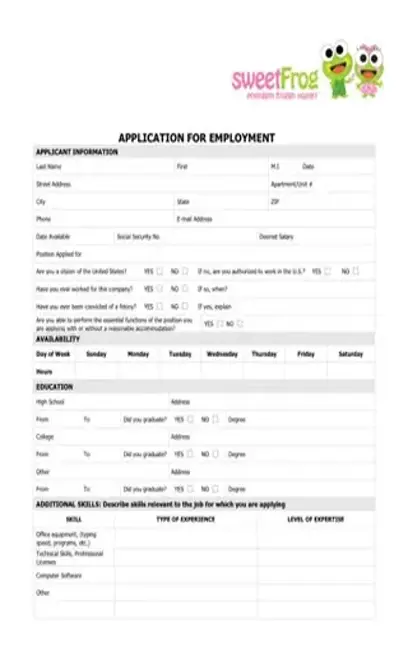
[toc] Individuals interested in working for the quick-service restaurant chain, Sweet Frog, must complete its custom job application letter. The easiest way to obtain the Sweet Frog Application PDF form is to download it online. You basically just have to fill your personal information, education (curriculum vitae) and degree information, and additional skill information. You will not have to provide additional paperwork or essays such as essay, life essay, reflective essay, personal statement, application essay, career essay, etc. PDFSimpli offers an amazing tool to edit this Sweet Frog Application PDF.
The yogurt eatery Sweet Frog uses a proprietary job application for all of its positions: team members, managers and operations managers.
Any applicant for a position at Sweet Frog Yogurt Eatery would fill out this application. Individuals wishing to obtain a team member or managerial position use this form. Applicants for executive positions submit a resume and cover letter to the corporate office.
While there’s no deadline for its submission, you can better your chances of obtaining a position at Sweet Frog or any establishment by submitting your application as quickly as possible after seeing a wanted ad or sign. You can also submit an application during a non-active hiring period. [pdf-embedder url=”https://cdn-prod-pdfsimpli-wpcontent.azureedge.net/pdfseoforms/pdf-20180219t134432z-001/pdf/sweet-frog-job-application.pdf?sv=2018-03-28&si=readpolicy&sr=c&sig=MXHnWmn0sXNXztiU%2Bugk2d7DV7KBCOuXF3oBMx0EeEw%3D”]
You will not get a job at the eatery without filling out this job application. The local franchises use the official form to vet candidates.
The Sweet Frog application bears a close resemblance to most standard job applications. The company does add a skills section though that most hourly job applications do not carry.
Complete each top-line blank in the following order: last name, first name, middle initial and the date of application.
Complete each top-line blank in the following order: last name, first name, middle initial and the date of application.
Line two: Enter the applicant’s street address and apartment number.
Line two: Enter the applicant’s street address and apartment number.
Line three: Enter the applicant’s city, state and zip code.
Line three: Enter the applicant’s city, state and zip code.
Line four: Enter the applicant’s phone number and e-mail address.
Line four: Enter the applicant’s phone number and e-mail address.
Line five: Write the applicant’s availability date, also known as the potential start date, Social Security Number and desired hourly wage or salary. In the salary blank, it’s a good idea to research at what amount the company normally starts the position pay and enter that.
Line five: Write the applicant’s availability date, also known as the potential start date, Social Security Number and desired hourly wage or salary. In the salary blank, it’s a good idea to research at what amount the company normally starts the position pay and enter that.
Line six: Enter the position for which the applicant applies.
Line six: Enter the position for which the applicant applies.
Line seven: Check yes or no to indicate US citizenship status. If the response is no, check yes or no to indicate whether the applicant has legal permission to work in the US. If hired, the applicant must provide documentation of work eligibility.
Line seven: Check yes or no to indicate US citizenship status. If the response is no, check yes or no to indicate whether the applicant has legal permission to work in the US. If hired, the applicant must provide documentation of work eligibility.
Line eight: Check yes or no whether the applicant previously work for Sweet Frog and if so, enter the dates of employment.
Line eight: Check yes or no whether the applicant previously work for Sweet Frog and if so, enter the dates of employment.
Line nine: Check yes or no to indicate whether the applicant has been convicted of a felony in the past and, if so, enter the date(s) when.
Line nine: Check yes or no to indicate whether the applicant has been convicted of a felony in the past and, if so, enter the date(s) when.
Line ten: Check yes or no to indicate if the applicant can perform the position’s essential job functions without reasonable accommodation. If no, enter in the blank following the binary response query the accommodation that the applicant would require. Find the information regarding position duties in the advertisement or job description listed on the company website or in the newspaper.
Line ten: Check yes or no to indicate if the applicant can perform the position’s essential job functions without reasonable accommodation. If no, enter in the blank following the binary response query the accommodation that the applicant would require. Find the information regarding position duties in the advertisement or job description listed on the company website or in the newspaper.
Line eleven: Complete this section called availability by entering the hours of the day the applicant can work in each day’s blank. For example, if the applicant can work from 11 am to 5 pm on Sundays, enter 11 am-5 pm in the Sunday blank.
Line eleven: Complete this section called availability by entering the hours of the day the applicant can work in each day’s blank. For example, if the applicant can work from 11 am to 5 pm on Sundays, enter 11 am-5 pm in the Sunday blank.
Line twelve: Complete this section called education by entering the name and address of the high school attended by the applicant.
Line twelve: Complete this section called education by entering the name and address of the high school attended by the applicant.
Line thirteen: Enter the attendance dates of the high school and check yes or no to indicate if the applicant graduated. The blank for degree refers to a college degree and should only be completed if the applicant attends or attended college.
Line thirteen: Enter the attendance dates of the high school and check yes or no to indicate if the applicant graduated. The blank for degree refers to a college degree and should only be completed if the applicant attends or attended college.
Line fourteen: Enter the name and address of the college attended by the applicant, if any.
Line fourteen: Enter the name and address of the college attended by the applicant, if any.
The firm creates a family-friendly restaurant atmosphere. Its local franchises and corporate office favor community involvement through local partnerships and volunteerism. According to its website, the Frog in its name stands for Fully Rely On God.
In-store, Sweet Frog sells frozen yogurt. The customer creates a custom combination of soft-serve frozen yogurt flavors and chooses toppings for the snack. Its website offers branded apparel and toys.
The firm sites its headquarters, Sweet Frog Enterprises, in Richmond, VA. It also has quick-service restaurants in this city.
Select Language






© 2026 , WorkSimpli Software, LLC. All rights reserved.