Photo Release Form Template
Stop searching and find out why people love the ease of creating beautiful and legally compliant Photo Release Form with PDFSimpli.
Stop searching and find out why people love the ease of creating beautiful and legally compliant Photo Release Form with PDFSimpli.

Pick from the colors and templates below



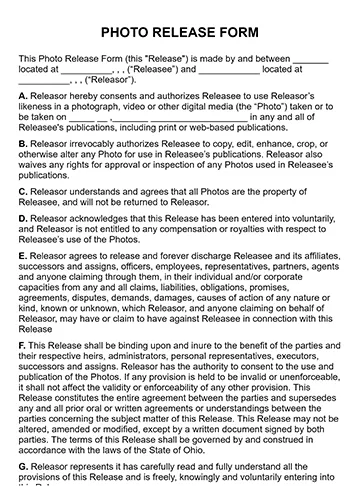
A photo release form is a legal document that gives photographers permission to publish an image of someone or something. Photo release forms generally allow the photographer to modify, sell, license, promote or otherwise use the image however they want to. By signing this document, the person appearing in the photo gives their permission for the image and their likeness to be used for commercial purposes. If you’re planning on using someone’s voice for commercial purchases or publishing a video featuring the person, you need a similar-but-slightly-different talent release form.
It’s important to understand that a photo release form doesn’t request permission to take the photo. Most of the time, it’s not legally necessary to ask for consent before taking pictures in public places. Instead, this form focuses on permission for publishing the image. A photo release form is a type of waiver, stating that the subject in the image — usually a model — is giving up their rights to the photograph.
There are several different kinds of image waivers: general photo release forms, model release forms, child or minor photo release forms, and property photo release forms. Each of these forms has somewhat different legal language, so you’ll want to use the right one for different situations. In the case of a child photo release form, for example, the minor’s parent or guardian signs the document. For property photo release forms, you need the owner’s signature to publish images of a home, vehicle, pet, business, bicycle, plant or another possession.
Professional photographers and other types of businesses often use a photo release form to obtain permission to publish, sell or use an image taken. This form covers photo shoots involving adults, minors, objects and pets. A model release form takes things a step further and contains additional details regarding any payment provided in exchange for this consent. There’s nothing wrong with snapping a picture of a happy couple in the park, for example, but if you’re planning on publishing or selling the photo, you need to ask them to sign a photo release form.
The first reason most expert photographers work extensively with photo release forms is because it’s the professional thing to do. It’s respectful to ask someone’s permission before using his or her likeness. In fact, many professional photojournalists and artists ask for consent to take the picture in the first place, even though they’re not legally required to if it’s a public place.
From a legal standpoint, you always need have a signed photo release form for every image you want to publish. That way you avoid costly copyright infringement lawsuits. Getting sued can lead to monetary damages and cease and desist orders that prevents you from using the images. Also, in the case of photographing minors, some states have passed laws making it illegal to take pictures of children without parental consent.
When customizing a photo release form to your needs, always use the broadest language possible so you’re covered in any current and future situations. Here are some important elements for any photo release:
Write the full name of the person, model, property owner, parent or guardian.
In the case of photos of a child, put the minor’s full name in this area.
Write the person’s complete street address, including the ZIP code.
Include your full name and address, or your business’s name and address.
Make sure the form has legal language related to how you want to use the image. This statement gives you express permission to use the person’s likeness in an digital media or print format with payment.
With a model release form, you need to specific language regarding any payment provided. There should be language indicating the model waives the right to any royalties and the right to inspect the photo prior to publishing.
This statement lets you edit, crop or otherwise alter the image in any way.
Put the date the document was signed.
Both you and the other person need to sign the form in the appropriate spaces.
It’s a good idea to have copies of several types of photo release forms with you on your photo shoots. When preparing the form, think about the information and legal language you need for your proposed usage. On location, ask the person for their information, such as full name and address.
When initially creating your photo release form, even if you use a template, you need software that lets you make changes. That way you can adapt the language to your specific usage and business. Also, you need PDF tools to fill out forms digitally, which can be handy in today’s mobile-friendly world. With PDFSimpli, you can edit PDF forms, add text, change text and make other modifications, all for free during your trial period.
Click on the tools at the top of the page to get started. The Add Text Tool is helpful for putting your name and the person’s name directly in the PDF document. You can also use the Erase Tool and the Add Text Tool together to change the specifics of legal language so it fits your needs closely.
Make sure your finished form offers the broadest protection for your business possible. Checking the information you filled in for accuracy is vital, especially the person’s legal name and address. This can prevent legal loopholes and other headaches from appearing.
When you’ve finished your form, you can click the Download Button to save the PDF and download it to your computer. It’s also easy to use PDFSimpli to send the PDF digitally to the person’s phone or email account to get an e-signature in seconds. This is very helpful if you need the consent of both parents to photograph a child
The specifics of what you need to include depend on the situation. General photograph release forms are often much simpler than model release forms. This is fine, because most people in the general public don’t expect compensation in exchange for signing the waiver. For photo shoots with models, always use a model release form.
You need a photo release form any time you want to publish an image. This means using it to promote your business or use for commercial purposes. If you’re a professional blogger or photographer, for example, you would still need a signed form even if you’re simply using the images to make your website look more attractive. This is considered commercial use.
Most photographers have models sign the photo release form before starting the shoot, while they’re getting ready. In public, request a signature either right before taking a photo or immediately afterwards. Don’t wait. Also, even if you’re planning on using images for purely personal use right now (such as posting on your personal twitter feed for friends and family), you may change your mind later. It’s easier to just get a signed photo release form from the beginning.
Select Language






© 2026 , WorkSimpli Software, LLC. All rights reserved.



